What is an AI whiteboard?
ProductMarvin Tunji-olaUpdated
An AI whiteboard is an infinite canvas where an AI writes and draws alongside you. You ask a question and the answer arrives as notes, boxes, arrows and diagrams laid out in space, rather than as a column of chat text. Everything it makes is an ordinary object on the canvas, so you can move it, edit it, draw over it or delete it, the same as anything you put there yourself.
That is the short definition. The term is new enough that it gets used for three different things: a chatbot with a drawing tool, a drawing app with a chat panel, and the thing described above. This guide sets out what the phrase means, how the real thing works, what it is good and bad at, what the research on visual learning says, and how to tell the three apart when you are choosing one.
How an AI whiteboard works
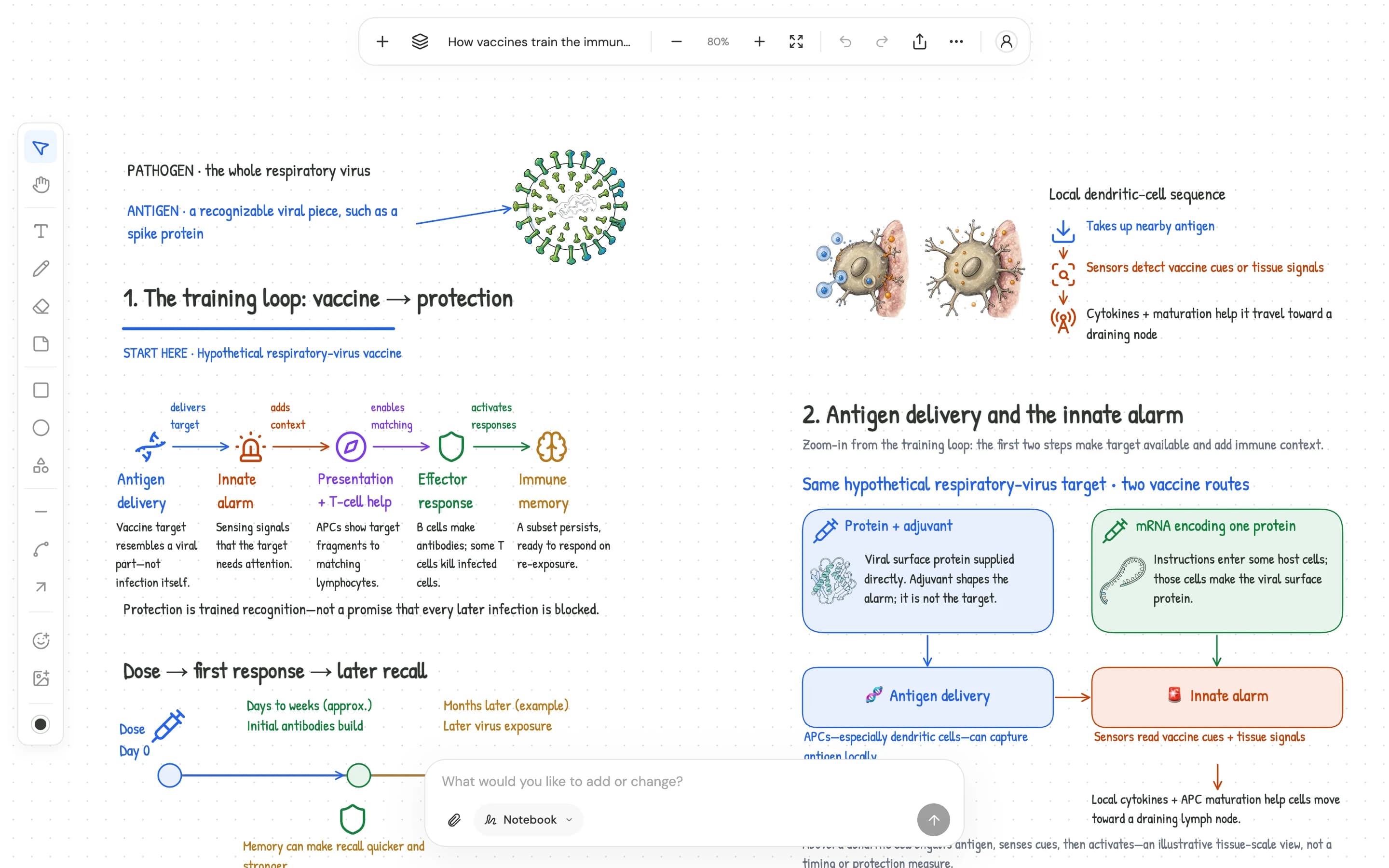
A normal whiteboard app stores a list of objects: text, sticky notes, shapes, lines, images, with positions. An AI whiteboard gives the AI the same tools you have. When you ask a question, the model does not return a paragraph. It returns a plan of objects: a heading here, three notes under it, a box to the right with an arrow pointing at it, a diagram with labelled parts, a picture beside the diagram. The board draws those objects one at a time, usually with a visible cursor, so you can watch the explanation being built and read as it goes.
Three things follow from that design, and they are what separate the category from everything else.
The practical detail that matters most: everything the AI makes is undoable and editable, because it is the same kind of object you make. If a tool says it is an AI whiteboard and the AI's output is an image you cannot edit, or text in a panel beside the canvas, it is one of the other two things.
How it differs from a chatbot
A chatbot gives you one answer at a time, in order. The second answer pushes the first off the screen. That is fine for a quick fact and bad for understanding anything with parts: a process, a comparison, a proof, a classification. In text, the parts are listed. On a board, they are placed, and the placement tells you how they relate.
Take a comparison. Ask a chatbot to compare an mRNA vaccine with a protein vaccine and you get two paragraphs, or a table if you are lucky. To read across them you scroll, and you hold one in your head while you read the other. On a board the two sit in boxes beside each other, with arrows down to the steps that follow, so your eye does the comparison.
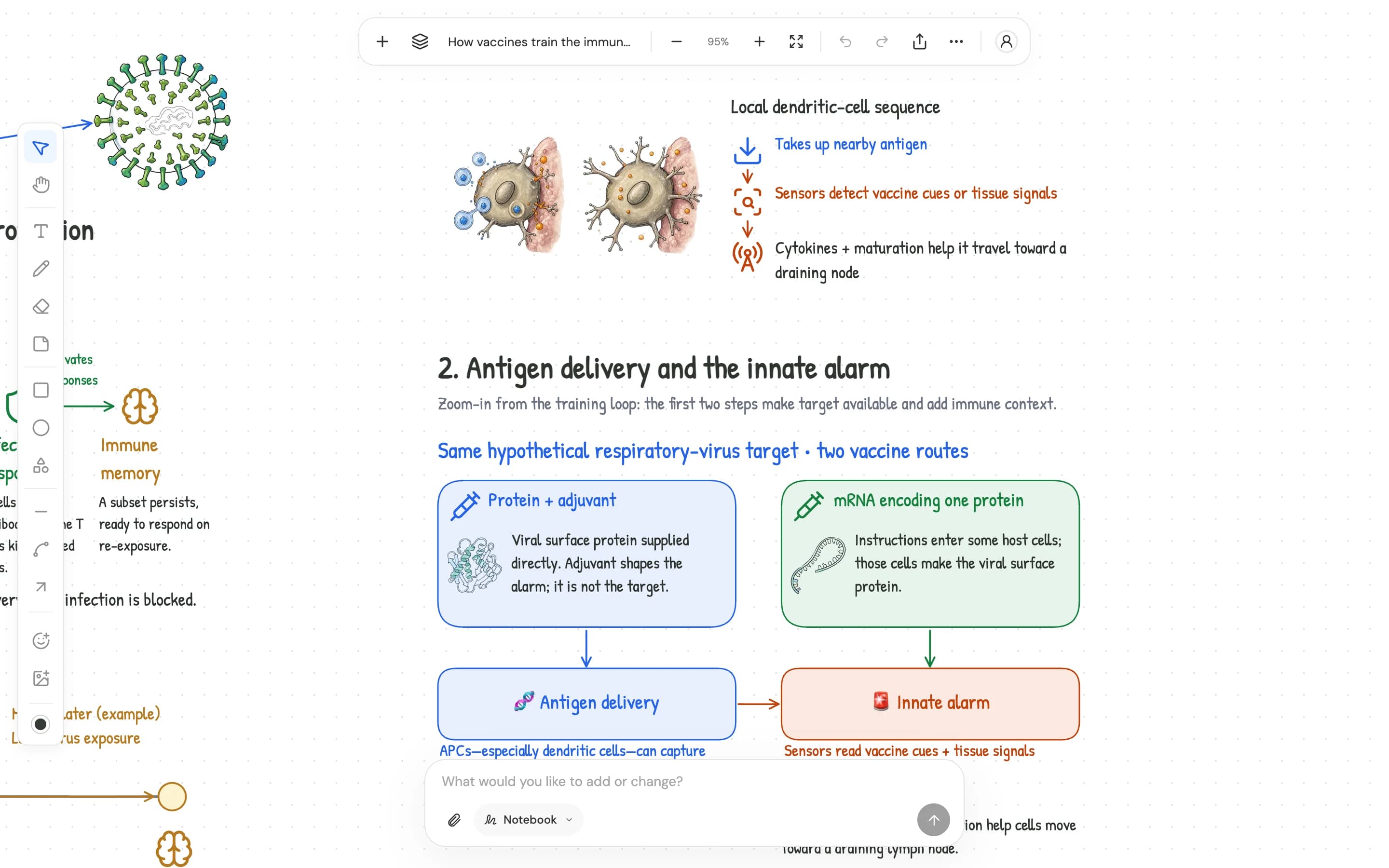
The second difference is ownership. Chat output is read-only. If one sentence in a long answer is wrong, you re-ask and the whole answer changes, including the parts that were right. Board output is shapes and text, so you fix the one word. Over a term that matters: your notes end up being a mix of what the AI wrote and what you corrected, which is what notes should be.
The third is that a chat log is not notes. Yesterday's explanation is somewhere up the scroll, between two other topics. A board on a topic is a thing you open, zoom out of, and see whole. There is a longer treatment of this in ChatGPT for studying: where it works and where a board does better.
How it differs from a drawing app with a chat panel
Several whiteboard and diagram apps have added an AI chat panel on the side. You draw on the canvas, the AI talks in the panel, and sometimes it can generate a diagram or a mind map from a prompt. That is useful, and it is not the same thing.
The difference is where the AI lives. In the panel model, the AI is a visitor: it answers in text and occasionally hands over a generated object. In an AI whiteboard, the AI is on the canvas: its cursor writes headings, places pictures and draws arrows where you can see them, beside your own work, and it reads your work when you ask the next thing. The test is simple. Select something you drew and ask the AI about it. If it can see what you selected and answer about that, it is on the board. If it cannot, it is in a panel.
A second difference is what "generate a diagram" produces. Many tools produce a diagram as one image or one locked group. An AI whiteboard produces a diagram as individual shapes, labels and connectors, so you can move one label, recolour one box or extend one arrow.
How it differs from a source notebook
Source notebooks, of which Google's NotebookLM is the best known, take your documents and answer questions about them with citations. They are good at reading a lot of material. The answers come back as text in a panel, sometimes with an audio summary.
An AI whiteboard can do the same job, reading your PDF and citing the page, but it lays the answer out in space and keeps it on a board you can edit and return to. The source notebook is better if your task is mostly reading and asking. The whiteboard is better if your task is understanding a topic with structure, or keeping notes you will revise from. Some tools, Bord among them, combine both: your files are sources on the board, and what the AI writes from them links to the page or the moment in the file.
What it is good for
It suits anything you would once have explained to someone at a physical whiteboard. The common cases:
The thread through all of these is that the thing being learned or planned has parts, and the relationship between the parts is what you need to understand. If you can picture explaining it on a whiteboard to a friend, an AI whiteboard fits.
What it is bad for
Long prose. If you want an essay drafted or a report written, a document is the right tool, and a chatbot or a writing assistant is the right AI. A board is for thinking in parts and seeing them at once; it is a poor place to read two thousand words in a row.
Pure memorisation at scale. Bord has flash cards with spaced repetition on the board, which covers the terms and steps of a course. A thousand vocabulary words or drug names drilled over years still want a dedicated app such as Anki, with its decades of shared decks and a review-only interface.
Small screens. A board rewards space. It works in a phone browser, but a laptop or tablet is where it earns its keep, as with any whiteboard.
What the research says about learning visually
The case for laying ideas out in space is not only taste. Three lines of research support it.
Dual coding. Allan Paivio's dual coding theory holds that verbal and visual information are processed in separate channels, and that something encoded in both is better remembered than something encoded in one [1]. Richard Mayer's multimedia principle, tested over two decades of experiments, finds that people learn better from words and pictures together than from words alone, provided the picture is relevant and placed next to the words it illustrates [2]. A board that writes the note and places the diagram beside it is that principle in practice.
Concept maps. A meta-analysis of 55 studies by Nesbit and Adesope found that studying with concept and knowledge maps improved retention and transfer compared with reading text, outlines or lists, with the largest gains when learners built or modified the maps themselves rather than only viewing them [3]. That last point matters: the value of a board is highest when you edit what the AI drew, not when you only read it.
Retrieval beats rereading. Karpicke and Blunt found that students who practised retrieving material learned more than students who spent the same time building a concept map of it [4], which is a warning as much as a support. Seeing a topic laid out is a start. Testing yourself on the layout, by covering labels, redrawing from memory or answering questions on the board, is where the learning happens. A good AI whiteboard builds testing in rather than leaving it to you.
How to tell a real one
When you are evaluating a tool that calls itself an AI whiteboard, run through these. A real one passes all of them.
- The AI's output is individual objects on the canvas, not an image and not text in a side panel.
- You can edit, move and delete anything the AI made, and undo it.
- You can select something on the board and ask the AI about only that.
- Diagrams come out as shapes, labels and connectors, not one locked picture.
- The AI reads what is already on the board before it adds to it.
- The board is still a useful whiteboard with the AI turned off.
Then the questions you would ask of any study tool: whether your files and boards are used to train models, whether answers from your material cite the page, whether you can try it without an account, and whether you can export your boards.
Where Bord fits
Bord is an infinite notebook and whiteboard first. The AI is something you turn on when you want it, and with it off you have a plain board with text, sticky notes, freehand drawing, shapes, images, a library of icons and diagram templates, and export to an image or a board file.
With it on, there are five modes, all on the same board. Ask writes the explanation out, with web search when a fact needs to be current. Quizbook builds a quiz on the board and grades it, including answers you give by marking, drawing or dragging pieces into place. Flashcards writes a deck of cards, grades your answers from memory and schedules each card's next review. Tutor teaches out loud and draws as it speaks, with checkpoint questions before it moves on. Live Notes records the lecture you are in and builds the notes while you listen. Drop a PDF, slides, a photo or a recording onto the board as a source and everything the AI writes from it links to the page or the moment.
You can try it as a guest without an account, and boards people have shared are on Explore, where you can read one and clone it into a board of your own.
Questions
Is an AI whiteboard the same as an AI mind map tool?
No. A mind map generator takes a prompt and returns one tree diagram. An AI whiteboard is a general canvas where the AI can write notes, draw any kind of diagram, place pictures, ask you questions and read what you have added. A mind map is one thing it can draw.
Can I use one without the AI?
A real one, yes. Bord with the AI off is an infinite notebook and whiteboard. If a tool is useless without its AI, the AI was the product and the board was a display.
Does it work on a phone?
In a browser, yes. A larger screen suits a board better, as it does any whiteboard. Reading a shared board on a phone is fine; building one is easier on a laptop or tablet.
Do I need to be able to draw?
No. The AI draws the diagrams. Your drawing is for sketching over them, circling what matters and answering questions by marking the board, where neatness does not count.
Is it free?
Guests get free weekly usage with no account, and there is a Free plan on top. Adding files and recording lectures need a free account. See pricing.
How is it different from NotebookLM?
NotebookLM answers questions about your documents in text, with citations. Bord does that too, but the answers are laid out on an editable board you keep, and the board can also quiz you, teach out loud and take lecture notes. If your work is mostly reading and asking, either works. If you need to see the structure of a topic, a board does more.
Sources
- Paivio, A. (1986). Mental Representations: A Dual Coding Approach. Oxford University Press.
- Mayer, R. E. (2009). Multimedia Learning (2nd ed.). Cambridge University Press.
- Nesbit, J. C., & Adesope, O. O. (2006). Learning with concept and knowledge maps: A meta-analysis. Review of Educational Research, 76(3), 413–448.
- Karpicke, J. D., & Blunt, J. R. (2011). Retrieval practice produces more learning than elaborative studying with concept mapping. Science, 331(6018), 772–775.
Try it on a board of your own.
No account needed to start. Guest boards stay on your device.